Yep, we may get a tiny thank-you (read: commission) when you buy through
links on Gadgetspotr — not enough for a yacht, but enough to keep the lights (and
servers) on.
Learn more
34
Highlights
59
Differences
7
Reactions
0
Likes
Abode Smart Security Kit
vs
Vivint Smart Hub:
34 Highlights & 59 Differences —
So, Which Security System Actually Works Better
Understand the benefits of each system based on installation, monitoring, and price.
We ran the full gadget test: Abode Smart Security Kit vs Vivint Smart Hub — from two-way audio, voice assistant alerts, battery capacity & backup battery runtime to design smarts, here’s how they compare.
Abode Smart Security Kit vs Vivint Smart Hub: Which Smart Security System Fits Your Needs?
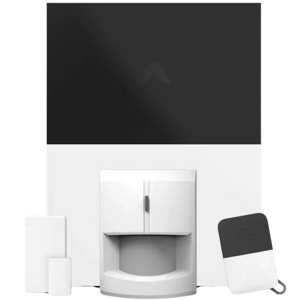
When it comes to securing your home with intelligent technology, the Abode Smart Security Kit and the Vivint Smart Hub stand out as formidable choices released in 2018. Both systems promise flexible installation options with wall or free-standing mounts and support expandable setups with zoning and control hubs for comprehensive home coverage. Their shared emphasis on reducing false alarms via pet immunity and motion verification, coupled with medium-capacity batteries ensuring long backup runtime, makes them strong contenders in smart home security. Additionally, each supports voice assistant alerts, including Alexa compatibility, and features offline modes to keep you protected even during connectivity hiccups.
However, these two differ considerably in subscription requirements, monitoring philosophies, camera capabilities, and integration options. The Abode kit operates as a hybrid system free from mandatory subscription fees, equipped with AI detection and cellular backup. In contrast, Vivint offers a fully monitored experience requiring a subscription, enhanced with two-way audio and professional installation. Their distinctions in security features, such as encryption standards and data export abilities, also affect the overall user experience and value proposition.
Abode Smart Security Kit: DIY Freedom with Smart Features
The Abode Smart Security Kit uniquely positions itself for do-it-yourself enthusiasts who demand a subscription-free system without compromising on advanced technology. Its expandable architecture supports zoning and a control hub capable of edge processing, allowing local data handling for quicker responses and enhanced privacy.
One standout feature is its cellular backup, keeping the system operational during internet outages; a vital aspect for reliable home protection. The system boasts pet immunity and motion verification, minimizing false alarms, and its motion detection range extends up to 35 feet with a standard 90°-120° angle for broad coverage.
The camera quality delivers 720p HD with snapshot capture functionality and medium night vision range (20-40 ft), facilitating effective monitoring during low light. Its security respects standards like FCC, CE, and RoHS compliance, although video encryption uses AES-128, which, while solid, is respectable but not the highest tier.
On the smart home front, Abode shines with IFTTT integration that enables customizable automation across various platforms. It also features AI detection and user profiles, providing tailored notifications and behavior learning to reduce false alarms and deliver meaningful alerts. Installation is straightforward, catering to users with moderate technical confidence, supported through email and live chat. Plus, the kit is affordably priced at around $199.99 at goabode.com, making it a budget-friendly option with robust capabilities.
Vivint Smart Hub: Premium Security with Professional Support
The Vivint Smart Hub represents a comprehensive monitored security system that suits users who prefer professional management and high-touch customer support. Requiring a subscription, this system offers a slightly longer motion detection range of 40 feet. It maintains the standard motion detection angle, delivering reliable environmental sensor monitoring with false alarm reduction technologies like pet immunity and motion verification.
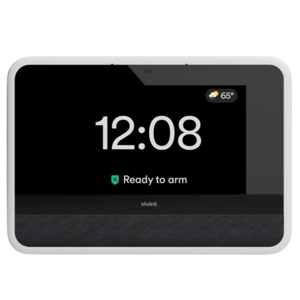
Where Vivint really stands out is in its sophisticated two-way audio, allowing homeowners to interact directly through the hub; a feature absent in Abode's offering. The camera maintains 720p HD quality but strengthens security with AES-256 encryption, offering enhanced protection for your video feeds, although it lacks snapshot capture and night vision support.
Connectivity-wise, Vivint supports dual-band Wi-Fi and an offline mode but does not include cellular backup or IFTTT integration, limiting some offline resilience and automation flexibility. It makes up for this with built-in cable management, a sleek design with only 0.9 inches in depth, and a lighter weight for a less obtrusive presence in your living space.
Installation is geared toward users seeking professional assistance, with Vivint offering multi-channel customer support, including phone, online chat, and a help center. These services, alongside scheduling options and robust notification customization, justify the higher cost of entry at around $599.99 at Vivint. While it lacks AI detection and user profiles, its monitored status might alleviate worries for those preferring expert supervision.
Quick Take
The Abode Smart Security Kit excels in flexibility, offering comprehensive independent operation with AI-powered detection, snapshot captures, and cellular backup at a compelling price. Vivint Smart Hub appeals to customers who want professional monitoring, two-way communication, and a streamlined, compact design backed by extensive support, albeit at a premium subscription cost.
Bottom Line
For budget-conscious users who appreciate DIY installation and smart home automation, the Abode Smart Security Kit is a standout choice, delivering intelligent features and offline resilience without ongoing fees. Meanwhile, Vivint Smart Hub suits those who prioritize professional monitoring, two-way audio interactivity, and expert installation support, ready to invest more for a hands-on managed experience.
Verdict
Winner: Abode Smart Security Kit - Because it offers flexible, subscription-free security with enriched AI features and cellular backup at an affordable price.
Runner-up: Vivint Smart Hub - Ideal for customers desiring professional monitoring, two-way audio, and premium support but willing to pay higher upfront and monthly costs.
Side by side. The numbers. The features. No drama.
Is Abode Smart Security Kit better than Vivint Smart Hub? It depends on your needs. Our gadget breakdown lays out the full story — from specs to buyer feedback.
Mounting Location is versatile for both systems, supporting Wall and Free-Standing setups. This makes either Abode Smart Security Kit or Vivint Smart Hub a flexible choice for varied installation environments.
Describes common mounting positions for system components.
In the battle of Mounting Location,
Abode Smart Security Kit ◉ is
same as
Vivint Smart Hub ◉
.
Don’t keep it to yourself — be the first to react and review the
Mounting Location on Abode Smart Security Kit ◉
vs Vivint Smart Hub ◉ and help others decide!
Abode Smart Security Kit does not require a subscription, while Vivint Smart Hub mandates one. For budget-conscious users, Abode may offer cost savings on ongoing fees compared to Vivint.
Shows whether ongoing subscription is mandatory for full features.
In the battle of Subscription Required,
Abode Smart Security Kit ◉ is
better than
Vivint Smart Hub ◉
.
Based on community votes for Subscription Required,
Abode Smart Security Kit ◉ earned
1 votes,
more than
Vivint Smart Hub ◉,
which got 0 votes.
Abode wins for me since it doesn't require subscription but Vivint needs one which could add cost in the long run.
See more
Environment Suitability
Where can the system be used?
0
Abode Smart Security Kit
0Votes
Indoor
0
Vivint Smart Hub
0Votes
Indoor
Abode Smart Security Kit
Designed for indoor use, ensuring effective performance in home environments.
Vivint Smart Hub
This model is designed for Indoor use, making it suitable for home security applications.
Specifies where the system components are designed to operate.
In the battle of Environment Suitability,
Abode Smart Security Kit ◉ is
same as
Vivint Smart Hub ◉
.
Don’t keep it to yourself — be the first to react and review the
Environment Suitability on Abode Smart Security Kit ◉
vs Vivint Smart Hub ◉ and help others decide!
Installation Type
How is the system installed?
0
Abode Smart Security Kit
0Votes
DIY
0
Vivint Smart Hub
0Votes
Professional
Abode Smart Security Kit
Installation type supports do-it-yourself configurations, making setup accessible.
Indicates how the system is intended to be installed.
In the battle of Installation Type,
Abode Smart Security Kit ◉ is
same as
Vivint Smart Hub ◉
.
Don’t keep it to yourself — be the first to react and review the
Installation Type on Abode Smart Security Kit ◉
vs Vivint Smart Hub ◉ and help others decide!
Product Type
What type of product is this?
0
Abode Smart Security Kit
0Votes
Security System
0
Vivint Smart Hub
0Votes
Security System
vs
Product Type
Both products are Security Systems, so they serve the same core function. Choosing between Abode Smart Security Kit and Vivint Smart Hub depends on more specific features rather than product type.
Defines the overall product category this device belongs to.
In the battle of Product Type,
Abode Smart Security Kit ◉ is
same as
Vivint Smart Hub ◉
.
Don’t keep it to yourself — be the first to react and review the
Product Type on Abode Smart Security Kit ◉
vs Vivint Smart Hub ◉ and help others decide!
Security System Type
What type of security system is it?
0
Abode Smart Security Kit
0Votes
Hybrid
0
Vivint Smart Hub
0Votes
Monitored
vs
Security System Type
The Security System Type differs between Abode Smart Security Kit as a Hybrid system and Vivint Smart Hub as a Monitored system. This makes Abode more flexible for self-monitoring, while Vivint offers professional monitoring, suiting users preferring managed security.
Indicates whether monitoring is professional, self-managed, or both.
In the battle of Security System Type,
Abode Smart Security Kit ◉ is
same as
Vivint Smart Hub ◉
.
Don’t keep it to yourself — be the first to react and review the
Security System Type on Abode Smart Security Kit ◉
vs Vivint Smart Hub ◉ and help others decide!
Intended Use Case
What is the intended use case?
0
Abode Smart Security Kit
0Votes
Home Security, Apartment
0
Vivint Smart Hub
0Votes
Home Security
Describes the primary scenario the system is designed for.
In the battle of Intended Use Case,
Abode Smart Security Kit ◉ is
same as
Vivint Smart Hub ◉
.
Don’t keep it to yourself — be the first to react and review the
Intended Use Case on Abode Smart Security Kit ◉
vs Vivint Smart Hub ◉ and help others decide!
0
Vivint Smart Hub
0Votes
Homeowners, Small Businesses
Identifies the typical user profile the system is built for.
In the battle of Target User,
Abode Smart Security Kit ◉ is
same as
Vivint Smart Hub ◉
.
Don’t keep it to yourself — be the first to react and review the
Target User on Abode Smart Security Kit ◉
vs Vivint Smart Hub ◉ and help others decide!
Release Year
What year was it released?
0
Abode Smart Security Kit
0Votes
2018
0
Vivint Smart Hub
0Votes
2018
vs
Release Year
Both Abode Smart Security Kit and Vivint Smart Hub were released in 2018, ensuring they share contemporaneous technology standards. For customers wanting modern equipment, either system provides up-to-date features from the same release period.
Indicates the year the system model was released.
In the battle of Release Year,
Abode Smart Security Kit ◉ is
same as
Vivint Smart Hub ◉
.
Don’t keep it to yourself — be the first to react and review the
Release Year on Abode Smart Security Kit ◉
vs Vivint Smart Hub ◉ and help others decide!
App Required
Is an app required?
Yes
0Votes
Abode Smart Security Kit
Yes
0Votes
Vivint Smart Hub
Indicates whether a mobile app is required for operation.
In the battle of App Required,
Abode Smart Security Kit ◉ is
same as
Vivint Smart Hub ◉
.
Don’t keep it to yourself — be the first to react and review the
App Required on Abode Smart Security Kit ◉
vs Vivint Smart Hub ◉ and help others decide!
In the battle of Operating System Compatibility,
Abode Smart Security Kit ◉ is
same as
Vivint Smart Hub ◉
.
Don’t keep it to yourself — be the first to react and review the
Operating System Compatibility on Abode Smart Security Kit ◉
vs Vivint Smart Hub ◉ and help others decide!
Both systems include a Control Hub, centralizing device management. Abode Smart Security Kit and Vivint Smart Hub users will benefit from streamlined control through their respective hubs.
Indicates whether a central control hub is part of the system.
In the battle of Control Hub,
Abode Smart Security Kit ◉ is
same as
Vivint Smart Hub ◉
.
Don’t keep it to yourself — be the first to react and review the
Control Hub on Abode Smart Security Kit ◉
vs Vivint Smart Hub ◉ and help others decide!
Both Abode Smart Security Kit and Vivint Smart Hub offer Expandability, allowing users to add components as needed. This ensures future-proofing and adaptability for evolving security needs with either system.
Shows whether additional devices can be added later.
In the battle of Expandability,
Abode Smart Security Kit ◉ is
same as
Vivint Smart Hub ◉
.
Don’t keep it to yourself — be the first to react and review the
Expandability on Abode Smart Security Kit ◉
vs Vivint Smart Hub ◉ and help others decide!
Zoning capability is present in both the Abode Smart Security Kit and Vivint Smart Hub. Users can customize security zones with either system for tailored protection within their homes.
Indicates whether areas can be divided into zones.
In the battle of Zoning,
Abode Smart Security Kit ◉ is
same as
Vivint Smart Hub ◉
.
Don’t keep it to yourself — be the first to react and review the
Zoning on Abode Smart Security Kit ◉
vs Vivint Smart Hub ◉ and help others decide!
System Topology
What is the system topology?
0
Abode Smart Security Kit
0Votes
Centralized
0
Vivint Smart Hub
0Votes
Centralized
Abode Smart Security Kit
System topology is centralized, which is often easier to manage and monitor.
Describes how system components are organized and managed.
In the battle of System Topology,
Abode Smart Security Kit ◉ is
same as
Vivint Smart Hub ◉
.
Don’t keep it to yourself — be the first to react and review the
System Topology on Abode Smart Security Kit ◉
vs Vivint Smart Hub ◉ and help others decide!
Backup Communication Path
Is there a backup communication path?
Yes
0Votes
Abode Smart Security Kit
Yes
0Votes
Vivint Smart Hub
Abode Smart Security Kit
Backup communication path is established, ensuring that notifications can still be delivered during network failures.
Indicates presence of secondary communication in case of failure.
In the battle of Backup Communication Path,
Abode Smart Security Kit ◉ is
same as
Vivint Smart Hub ◉
.
Don’t keep it to yourself — be the first to react and review the
Backup Communication Path on Abode Smart Security Kit ◉
vs Vivint Smart Hub ◉ and help others decide!
Maximum Supported Devices
How many devices are supported?
160
0Votes
232
0Votes
The maximum number of devices the system can support.
In the battle of Maximum Supported Devices,
Abode Smart Security Kit ◉ is
worse than
Vivint Smart Hub ◉
, delivering
lower
72.0
measurement.
Don’t keep it to yourself — be the first to react and review the
Maximum Supported Devices on Abode Smart Security Kit ◉
vs Vivint Smart Hub ◉ and help others decide!
Coverage Area
What area can it cover?
Who knows?
0Votes
Abode Smart Security Kit
(Help us out by suggesting one!)
Who knows?
0Votes
Vivint Smart Hub
(Help us out by suggesting one!)
The total area the system can effectively monitor.
Don’t keep it to yourself — be the first to react and review the
Coverage Area on Abode Smart Security Kit ◉
vs Vivint Smart Hub ◉ and help others decide!
Zone Count
How many zones are supported?
Who knows?
0Votes
Abode Smart Security Kit
(Help us out by suggesting one!)
Who knows?
0Votes
Vivint Smart Hub
(Help us out by suggesting one!)
The number of independent zones supported.
Don’t keep it to yourself — be the first to react and review the
Zone Count on Abode Smart Security Kit ◉
vs Vivint Smart Hub ◉ and help others decide!
Multi-Property
Can it manage multiple properties?
Yes
0Votes
Abode Smart Security Kit
No
0Votes
Vivint Smart Hub
Shows whether multiple locations can be managed together.
In the battle of Multi-Property,
Abode Smart Security Kit ◉ is
better than
Vivint Smart Hub ◉
.
Don’t keep it to yourself — be the first to react and review the
Multi-Property on Abode Smart Security Kit ◉
vs Vivint Smart Hub ◉ and help others decide!
Mesh Networking
Does it support mesh networking?
Yes
0Votes
Abode Smart Security Kit
No
0Votes
Vivint Smart Hub
Shows whether devices can relay signals through each other.
In the battle of Mesh Networking,
Abode Smart Security Kit ◉ is
better than
Vivint Smart Hub ◉
.
Don’t keep it to yourself — be the first to react and review the
Mesh Networking on Abode Smart Security Kit ◉
vs Vivint Smart Hub ◉ and help others decide!
Redundancy Design
Is redundancy built into the system?
Yes
0Votes
Abode Smart Security Kit
Yes
0Votes
Vivint Smart Hub
Indicates built-in redundancy to prevent single-point failure.
In the battle of Redundancy Design,
Abode Smart Security Kit ◉ is
same as
Vivint Smart Hub ◉
.
Don’t keep it to yourself — be the first to react and review the
Redundancy Design on Abode Smart Security Kit ◉
vs Vivint Smart Hub ◉ and help others decide!
Failover Capability
Does it support failover?
Yes
0Votes
Abode Smart Security Kit
Yes
0Votes
Vivint Smart Hub
Describes automatic switching during system disruptions.
In the battle of Failover Capability,
Abode Smart Security Kit ◉ is
same as
Vivint Smart Hub ◉
.
Don’t keep it to yourself — be the first to react and review the
Failover Capability on Abode Smart Security Kit ◉
vs Vivint Smart Hub ◉ and help others decide!
Edge Processing
Does it support edge processing?
Yes
0Votes
Abode Smart Security Kit
No
0Votes
Vivint Smart Hub
vs
Edge Processing
Abode Smart Security Kit features Edge Processing whereas Vivint Smart Hub does not. This allows Abode to process some data locally, which can enhance speed and privacy, making it ideal for users valuing these traits in security.
Indicates whether processing happens locally on devices.
In the battle of Edge Processing,
Abode Smart Security Kit ◉ is
better than
Vivint Smart Hub ◉
.
Don’t keep it to yourself — be the first to react and review the
Edge Processing on Abode Smart Security Kit ◉
vs Vivint Smart Hub ◉ and help others decide!
System Scalability Level
How scalable is the system?
0
Abode Smart Security Kit
0Votes
Medium
0
Vivint Smart Hub
0Votes
High
Qualitative measure of how well the system scales.
In the battle of System Scalability Level,
Abode Smart Security Kit ◉ is
same as
Vivint Smart Hub ◉
.
Don’t keep it to yourself — be the first to react and review the
System Scalability Level on Abode Smart Security Kit ◉
vs Vivint Smart Hub ◉ and help others decide!
0
Abode Smart Security Kit
0Votes
Pet Immunity, Motion Verification
0
Vivint Smart Hub
0Votes
Pet Immunity, Motion Verification
vs
False Alarm Reduction Technology
Both Abode Smart Security Kit and Vivint Smart Hub feature False Alarm Reduction Technologies including Pet Immunity and Motion Verification. These prevent unnecessary alerts, enhancing user convenience and accuracy in both systems.
Describes technologies used to minimize incorrect or nuisance alerts.
In the battle of False Alarm Reduction Technology,
Abode Smart Security Kit ◉ is
same as
Vivint Smart Hub ◉
.
Don’t keep it to yourself — be the first to react and review the
False Alarm Reduction Technology on Abode Smart Security Kit ◉
vs Vivint Smart Hub ◉ and help others decide!
Motion Detection Range is 35 ft for Abode Smart Security Kit versus 40 ft for Vivint Smart Hub, a 5 ft advantage to Vivint. If longer motion sensing is priority, Vivint Smart Hub better suits this need.
The maximum distance at which motion can be detected.
In the battle of Motion Detection Range,
Abode Smart Security Kit ◉ is
worse than
Vivint Smart Hub ◉
, delivering
lower
5.0 ft
measurement.
Based on community votes for Motion Detection Range,
Abode Smart Security Kit ◉ earned
0 votes,
less than
Vivint Smart Hub ◉,
which got 1 votes.
Environmental Sensors are supported by both Abode Smart Security Kit and Vivint Smart Hub. This helps users monitor conditions like temperature or humidity, providing additional home safety features.
Indicates support for non-intrusion environmental sensing.
In the battle of Environmental Sensor,
Abode Smart Security Kit ◉ is
same as
Vivint Smart Hub ◉
.
Don’t keep it to yourself — be the first to react and review the
Environmental Sensor on Abode Smart Security Kit ◉
vs Vivint Smart Hub ◉ and help others decide!
Glass Break Detection
Does it detect glass breakage?
Yes
0Votes
Abode Smart Security Kit
Yes
0Votes
Vivint Smart Hub
Abode Smart Security Kit
Glass break detection is enabled, which helps in identifying potential break-ins.
Detects the sound or vibration of breaking glass.
In the battle of Glass Break Detection,
Abode Smart Security Kit ◉ is
same as
Vivint Smart Hub ◉
.
Don’t keep it to yourself — be the first to react and review the
Glass Break Detection on Abode Smart Security Kit ◉
vs Vivint Smart Hub ◉ and help others decide!
Door and Window Sensor Type
What type of door and window sensor is used?
0
Abode Smart Security Kit
0Votes
Magnetic Contact
0
Vivint Smart Hub
0Votes
Magnetic Contact
Abode Smart Security Kit
Door and window sensors utilize magnetic contact technology, providing reliable detection.
Describes the sensor technology used to detect opening or movement of doors and windows.
In the battle of Door and Window Sensor Type,
Abode Smart Security Kit ◉ is
same as
Vivint Smart Hub ◉
.
Don’t keep it to yourself — be the first to react and review the
Door and Window Sensor Type on Abode Smart Security Kit ◉
vs Vivint Smart Hub ◉ and help others decide!
Tamper Detection
Is tamper detection supported?
Yes
0Votes
Abode Smart Security Kit
Yes
0Votes
Vivint Smart Hub
Abode Smart Security Kit
Tamper detection is active, which means the system can alert users if it has been interfered with.
Alerts when a sensor is moved or interfered with.
In the battle of Tamper Detection,
Abode Smart Security Kit ◉ is
same as
Vivint Smart Hub ◉
.
Don’t keep it to yourself — be the first to react and review the
Tamper Detection on Abode Smart Security Kit ◉
vs Vivint Smart Hub ◉ and help others decide!
Smoke Detection
Does it support smoke detection?
Yes
0Votes
Abode Smart Security Kit
Yes
0Votes
Vivint Smart Hub
Abode Smart Security Kit
Smoke detection is operational, thus enhancing fire safety by alerting users in case of smoke.
Shows whether smoke detection sensors are supported.
In the battle of Smoke Detection,
Abode Smart Security Kit ◉ is
same as
Vivint Smart Hub ◉
.
Don’t keep it to yourself — be the first to react and review the
Smoke Detection on Abode Smart Security Kit ◉
vs Vivint Smart Hub ◉ and help others decide!
CO Detection
Does it detect carbon monoxide?
Yes
0Votes
Abode Smart Security Kit
Yes
0Votes
Vivint Smart Hub
Abode Smart Security Kit
CO detection is active, which helps in identifying carbon monoxide presence, crucial for safety.
Indicates carbon monoxide detection capability.
In the battle of CO Detection,
Abode Smart Security Kit ◉ is
same as
Vivint Smart Hub ◉
.
Don’t keep it to yourself — be the first to react and review the
CO Detection on Abode Smart Security Kit ◉
vs Vivint Smart Hub ◉ and help others decide!
Flood and Leak Detection
Does the system support flood and leak detection?
Yes
0Votes
Abode Smart Security Kit
No
0Votes
Vivint Smart Hub
Abode Smart Security Kit
Flood and leak detection is enabled, providing an essential safety feature for protecting property.
Indicates whether the system can detect water leaks or flooding events to prevent property damage.
In the battle of Flood and Leak Detection,
Abode Smart Security Kit ◉ is
better than
Vivint Smart Hub ◉
.
Don’t keep it to yourself — be the first to react and review the
Flood and Leak Detection on Abode Smart Security Kit ◉
vs Vivint Smart Hub ◉ and help others decide!
The Adjustable Multi-Level sensor sensitivity option allows users to choose the precise level needed based on their environment, enhancing performance.
Indicates how sensitive the sensor is to motion or environmental changes.
In the battle of Sensor Sensitivity Levels,
Abode Smart Security Kit ◉ is
same as
Vivint Smart Hub ◉
.
Don’t keep it to yourself — be the first to react and review the
Sensor Sensitivity Levels on Abode Smart Security Kit ◉
vs Vivint Smart Hub ◉ and help others decide!
Motion Sensor Type
What type of motion sensor is used?
0
Abode Smart Security Kit
0Votes
PIR
0
Vivint Smart Hub
0Votes
PIR
Identifies the technology used for motion detection.
In the battle of Motion Sensor Type,
Abode Smart Security Kit ◉ is
same as
Vivint Smart Hub ◉
.
Don’t keep it to yourself — be the first to react and review the
Motion Sensor Type on Abode Smart Security Kit ◉
vs Vivint Smart Hub ◉ and help others decide!
Motion Detection Angle
What is the motion detection angle?
0
Abode Smart Security Kit
0Votes
Standard (90°–120°)
0
Vivint Smart Hub
0Votes
Standard (90°–120°)
vs
Motion Detection Angle
Both systems offer a Standard Motion Detection Angle of 90°–120°, providing comparable field of view for motion sensing. Either Abode Smart Security Kit or Vivint Smart Hub supplies reliable motion coverage.
Describes the horizontal coverage angle of the motion sensor for detecting movement.
In the battle of Motion Detection Angle,
Abode Smart Security Kit ◉ is
same as
Vivint Smart Hub ◉
.
Don’t keep it to yourself — be the first to react and review the
Motion Detection Angle on Abode Smart Security Kit ◉
vs Vivint Smart Hub ◉ and help others decide!
Pet Immunity
Does it support pet immunity?
Yes
0Votes
Abode Smart Security Kit
No
0Votes
Vivint Smart Hub
Indicates whether pets are ignored during motion detection.
In the battle of Pet Immunity,
Abode Smart Security Kit ◉ is
better than
Vivint Smart Hub ◉
.
Don’t keep it to yourself — be the first to react and review the
Pet Immunity on Abode Smart Security Kit ◉
vs Vivint Smart Hub ◉ and help others decide!
Shock and Vibration Detection
Does the system detect shock or vibration?
Yes
0Votes
Abode Smart Security Kit
No
0Votes
Vivint Smart Hub
Indicates whether the system can detect physical impact, shock, or vibration events on protected surfaces.
In the battle of Shock and Vibration Detection,
Abode Smart Security Kit ◉ is
better than
Vivint Smart Hub ◉
.
Don’t keep it to yourself — be the first to react and review the
Shock and Vibration Detection on Abode Smart Security Kit ◉
vs Vivint Smart Hub ◉ and help others decide!
Sensor Sampling Rate
What is the sensor sampling rate?
Who knows?
0Votes
Abode Smart Security Kit
(Help us out by suggesting one!)
Who knows?
0Votes
Vivint Smart Hub
(Help us out by suggesting one!)
Frequency at which sensors collect detection data.
Don’t keep it to yourself — be the first to react and review the
Sensor Sampling Rate on Abode Smart Security Kit ◉
vs Vivint Smart Hub ◉ and help others decide!
Sensor Calibration
Can sensors be calibrated?
Yes
0Votes
Abode Smart Security Kit
Yes
0Votes
Vivint Smart Hub
Indicates whether sensors can be calibrated for accuracy.
In the battle of Sensor Calibration,
Abode Smart Security Kit ◉ is
same as
Vivint Smart Hub ◉
.
Don’t keep it to yourself — be the first to react and review the
Sensor Calibration on Abode Smart Security Kit ◉
vs Vivint Smart Hub ◉ and help others decide!
Camera Resolution is HD (720p) for both Abode Smart Security Kit and Vivint Smart Hub. Both systems give standard resolution cameras, good for basic monitoring but may lack ultra high-definition detail.
Indicates the level of detail captured in video recordings.
In the battle of Camera Resolution,
Abode Smart Security Kit ◉ is
same as
Vivint Smart Hub ◉
.
Don’t keep it to yourself — be the first to react and review the
Camera Resolution on Abode Smart Security Kit ◉
vs Vivint Smart Hub ◉ and help others decide!
Night Vision feature is not available for Abode Smart Security Kit, and also missing for Vivint Smart Hub. Neither system supports night vision, potentially limiting low-light video monitoring.
Indicates whether the camera can record in low-light conditions.
Don’t keep it to yourself — be the first to react and review the
Night Vision on Abode Smart Security Kit ◉
vs Vivint Smart Hub ◉ and help others decide!
Snapshot Capture is enabled on Abode Smart Security Kit but unavailable on Vivint Smart Hub. Abode users benefit from still image captures for additional event documentation.
Enables capturing still images from video feeds.
In the battle of Snapshot Capture,
Abode Smart Security Kit ◉ is
better than
Vivint Smart Hub ◉
.
Don’t keep it to yourself — be the first to react and review the
Snapshot Capture on Abode Smart Security Kit ◉
vs Vivint Smart Hub ◉ and help others decide!
Video Encryption Method
How is video encrypted?
0
Abode Smart Security Kit
0Votes
AES-128
0
Vivint Smart Hub
1Votes
AES-256
vs
Video Encryption Method
Video Encryption differs: Abode Smart Security Kit uses AES-128, while Vivint Smart Hub offers stronger AES-256 encryption. Vivint may be preferable for users prioritizing highest-level video security.
Defines how video data is protected during transmission and storage.
In the battle of Video Encryption Method,
Abode Smart Security Kit ◉ is
same as
Vivint Smart Hub ◉
.
Based on community votes for Video Encryption Method,
Abode Smart Security Kit ◉ earned
0 votes,
less than
Vivint Smart Hub ◉,
which got 1 votes.
Video encryption on Vivint is AES-256 whereas Abode uses AES-128 so Vivint takes the lead for better security there.
See more
Live View
Is live view available?
Yes
0Votes
Abode Smart Security Kit
Yes
0Votes
Vivint Smart Hub
Abode Smart Security Kit
Live view feature allows users to monitor feeds in real-time for timely responses.
Allows users to view camera feeds in real time.
In the battle of Live View,
Abode Smart Security Kit ◉ is
same as
Vivint Smart Hub ◉
.
Don’t keep it to yourself — be the first to react and review the
Live View on Abode Smart Security Kit ◉
vs Vivint Smart Hub ◉ and help others decide!
Camera Placement Flexibility
How flexible is camera placement?
Who knows?
0Votes
Abode Smart Security Kit
(Help us out by suggesting one!)
0
Vivint Smart Hub
0Votes
Fixed
Vivint Smart Hub
Camera placement is Fixed, which can be ideal for specific monitoring locations.
Indicates how freely cameras can be positioned.
Don’t keep it to yourself — be the first to react and review the
Camera Placement Flexibility on Abode Smart Security Kit ◉
vs Vivint Smart Hub ◉ and help others decide!
Camera
Is a camera included?
No
0Votes
Abode Smart Security Kit
Yes
0Votes
Vivint Smart Hub
Indicates whether at least one camera is included in the system package.
In the battle of Camera,
Abode Smart Security Kit ◉ is
worse than
Vivint Smart Hub ◉
.
Don’t keep it to yourself — be the first to react and review the
Camera on Abode Smart Security Kit ◉
vs Vivint Smart Hub ◉ and help others decide!
Frame Rate
What is the video frame rate?
Who knows?
0Votes
Abode Smart Security Kit
(Help us out by suggesting one!)
30
Hz
0Votes
The number of video frames captured per second.
Don’t keep it to yourself — be the first to react and review the
Frame Rate on Abode Smart Security Kit ◉
vs Vivint Smart Hub ◉ and help others decide!
Field of View
What is the field of view?
Who knows?
0Votes
Abode Smart Security Kit
(Help us out by suggesting one!)
0
Vivint Smart Hub
0Votes
Standard (90°–120°)
Describes the horizontal viewing angle of the camera.
Don’t keep it to yourself — be the first to react and review the
Field of View on Abode Smart Security Kit ◉
vs Vivint Smart Hub ◉ and help others decide!
Digital Zoom Level
What digital zoom level is supported?
Who knows?
0Votes
Abode Smart Security Kit
(Help us out by suggesting one!)
0
Vivint Smart Hub
0Votes
None
Indicates the maximum digital zoom supported.
Don’t keep it to yourself — be the first to react and review the
Digital Zoom Level on Abode Smart Security Kit ◉
vs Vivint Smart Hub ◉ and help others decide!
Night Vision Range
What is the night vision range?
0
Abode Smart Security Kit
0Votes
Medium (20–40 ft)
Who knows?
0Votes
Vivint Smart Hub
(Help us out by suggesting one!)
vs
Night Vision Range
Night Vision Range is Medium (20–40 ft) for Abode Smart Security Kit but not available for Vivint Smart Hub. Abode is better suited for night-time visibility within its range.
Defines how far the camera can see in low-light conditions.
Don’t keep it to yourself — be the first to react and review the
Night Vision Range on Abode Smart Security Kit ◉
vs Vivint Smart Hub ◉ and help others decide!
Video Compression Format
What video compression is used?
0
Abode Smart Security Kit
0Votes
H.264
0
Vivint Smart Hub
0Votes
H.264
Specifies how video files are compressed for storage and streaming.
In the battle of Video Compression Format,
Abode Smart Security Kit ◉ is
same as
Vivint Smart Hub ◉
.
Don’t keep it to yourself — be the first to react and review the
Video Compression Format on Abode Smart Security Kit ◉
vs Vivint Smart Hub ◉ and help others decide!
HDR
Does it support HDR?
No
0Votes
Abode Smart Security Kit
No
0Votes
Vivint Smart Hub
Enhances visibility in high-contrast lighting conditions.
In the battle of HDR,
Abode Smart Security Kit ◉ is
same as
Vivint Smart Hub ◉
.
Don’t keep it to yourself — be the first to react and review the
HDR on Abode Smart Security Kit ◉
vs Vivint Smart Hub ◉ and help others decide!
Video Latency
How much video latency is there?
0
Abode Smart Security Kit
0Votes
Low
0
Vivint Smart Hub
0Votes
Low
Describes the delay between real-world events and video display.
In the battle of Video Latency,
Abode Smart Security Kit ◉ is
same as
Vivint Smart Hub ◉
.
Don’t keep it to yourself — be the first to react and review the
Video Latency on Abode Smart Security Kit ◉
vs Vivint Smart Hub ◉ and help others decide!
Multi-Camera View
Can multiple cameras be viewed at once?
Yes
0Votes
Abode Smart Security Kit
Yes
0Votes
Vivint Smart Hub
Allows viewing multiple camera feeds simultaneously.
In the battle of Multi-Camera View,
Abode Smart Security Kit ◉ is
same as
Vivint Smart Hub ◉
.
Don’t keep it to yourself — be the first to react and review the
Multi-Camera View on Abode Smart Security Kit ◉
vs Vivint Smart Hub ◉ and help others decide!
Camera Tamper Detection
Is camera tampering detected?
Yes
0Votes
Abode Smart Security Kit
Yes
0Votes
Vivint Smart Hub
Detects obstruction or movement of the camera.
In the battle of Camera Tamper Detection,
Abode Smart Security Kit ◉ is
same as
Vivint Smart Hub ◉
.
Don’t keep it to yourself — be the first to react and review the
Camera Tamper Detection on Abode Smart Security Kit ◉
vs Vivint Smart Hub ◉ and help others decide!
Two-Way Audio is not present in Abode Smart Security Kit but included in Vivint Smart Hub. Vivint offers enhanced communication capabilities, useful for remote interaction through the system.
Allows users to speak and listen through the system remotely.
In the battle of Two-Way Audio,
Abode Smart Security Kit ◉ is
worse than
Vivint Smart Hub ◉
.
Based on community votes for Two-Way Audio,
Abode Smart Security Kit ◉ earned
0 votes,
less than
Vivint Smart Hub ◉,
which got 1 votes.
Voice Assistant Alerts are supported by both Abode Smart Security Kit and Vivint Smart Hub, providing convenient notifications via Alexa, Google Assistant, or Siri (Abode) or Alexa and Google Assistant (Vivint).
Enables alarm notifications via voice assistants.
In the battle of Voice Assistant Alerts,
Abode Smart Security Kit ◉ is
same as
Vivint Smart Hub ◉
.
Don’t keep it to yourself — be the first to react and review the
Voice Assistant Alerts on Abode Smart Security Kit ◉
vs Vivint Smart Hub ◉ and help others decide!
Siren Volume Level
How loud is the siren?
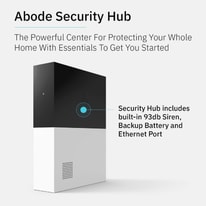
93
dB
0Votes
100
dB
0Votes
Vivint Smart Hub
The siren volume reaches 100 dB, providing an effective deterrent against intrusions.
Measures how loud the alarm siren can sound.
In the battle of Siren Volume Level,
Abode Smart Security Kit ◉ is
worse than
Vivint Smart Hub ◉
, delivering
lower
7.0 dB
measurement.
Don’t keep it to yourself — be the first to react and review the
Siren Volume Level on Abode Smart Security Kit ◉
vs Vivint Smart Hub ◉ and help others decide!
0
Vivint Smart Hub
0Votes
Sensor-Based, Manual, Remote
vs
Alarm Trigger Methods
Alarm Trigger Methods are identical: Sensor-Based, Manual, and Remote for both Abode Smart Security Kit and Vivint Smart Hub. Users can trigger alarms flexibly in either system.
Describes how alarms can be activated.
In the battle of Alarm Trigger Methods,
Abode Smart Security Kit ◉ is
same as
Vivint Smart Hub ◉
.
Don’t keep it to yourself — be the first to react and review the
Alarm Trigger Methods on Abode Smart Security Kit ◉
vs Vivint Smart Hub ◉ and help others decide!
Panic Button
Is there a panic button?
Yes
0Votes
Abode Smart Security Kit
Yes
0Votes
Vivint Smart Hub
Abode Smart Security Kit
Panic button functionality is available, providing users with a quick method to signal for help.
Allows instant alarm activation during emergencies.
In the battle of Panic Button,
Abode Smart Security Kit ◉ is
same as
Vivint Smart Hub ◉
.
Don’t keep it to yourself — be the first to react and review the
Panic Button on Abode Smart Security Kit ◉
vs Vivint Smart Hub ◉ and help others decide!
Audio Codec
What audio codec is used?
Who knows?
0Votes
Abode Smart Security Kit
(Help us out by suggesting one!)
0
Vivint Smart Hub
0Votes
Proprietary Codec
Specifies the audio compression format used for voice transmission.
Don’t keep it to yourself — be the first to react and review the
Audio Codec on Abode Smart Security Kit ◉
vs Vivint Smart Hub ◉ and help others decide!
Siren
Is a siren included?
Yes
0Votes
Abode Smart Security Kit
Yes
0Votes
Vivint Smart Hub
vs
Siren
Both systems include a Siren, ensuring audible alerts for security events. Abode Smart Security Kit and Vivint Smart Hub equally support alarm sound notifications.
Indicates whether an audible siren is built into the system.
In the battle of Siren,
Abode Smart Security Kit ◉ is
same as
Vivint Smart Hub ◉
.
Don’t keep it to yourself — be the first to react and review the
Siren on Abode Smart Security Kit ◉
vs Vivint Smart Hub ◉ and help others decide!
0
Vivint Smart Hub
0Votes
Intrusion, Fire, Medical
Lists the categories of alarms the system can trigger.
In the battle of Alarm Types,
Abode Smart Security Kit ◉ is
same as
Vivint Smart Hub ◉
.
Don’t keep it to yourself — be the first to react and review the
Alarm Types on Abode Smart Security Kit ◉
vs Vivint Smart Hub ◉ and help others decide!
Silent Alarm Mode
Is silent alarm mode available?
Yes
0Votes
Abode Smart Security Kit
Yes
0Votes
Vivint Smart Hub
vs
Silent Alarm Mode
Silent Alarm Mode is enabled in both Abode Smart Security Kit and Vivint Smart Hub, allowing discreet alerting which is valuable for covert security scenarios.
Enables discreet alerts without audible sirens.
In the battle of Silent Alarm Mode,
Abode Smart Security Kit ◉ is
same as
Vivint Smart Hub ◉
.
Don’t keep it to yourself — be the first to react and review the
Silent Alarm Mode on Abode Smart Security Kit ◉
vs Vivint Smart Hub ◉ and help others decide!
Alarm Customization Levels
How customizable are the alarms?
0
Abode Smart Security Kit
0Votes
Basic
0
Vivint Smart Hub
0Votes
Advanced
Indicates how extensively alarm behavior can be configured.
In the battle of Alarm Customization Levels,
Abode Smart Security Kit ◉ is
same as
Vivint Smart Hub ◉
.
Don’t keep it to yourself — be the first to react and review the
Alarm Customization Levels on Abode Smart Security Kit ◉
vs Vivint Smart Hub ◉ and help others decide!
Cellular Backup is available on Abode Smart Security Kit but not on Vivint Smart Hub, making Abode more reliable during internet outages with uninterrupted connectivity.
Provides connectivity when primary internet fails.
In the battle of Cellular Backup,
Abode Smart Security Kit ◉ is
better than
Vivint Smart Hub ◉
.
Don’t keep it to yourself — be the first to react and review the
Cellular Backup on Abode Smart Security Kit ◉
vs Vivint Smart Hub ◉ and help others decide!
0
Abode Smart Security Kit
0Votes
Alexa, Google Assistant, Siri
0
Vivint Smart Hub
0Votes
Alexa, Google Assistant
vs
Voice Assistant Compatibility
Voice Assistant Compatibility for Abode Smart Security Kit includes Alexa, Google Assistant, and Siri, whereas Vivint Smart Hub supports Alexa and Google Assistant only. Abode offers broader smart assistant integration.
Specifies supported voice assistants.
In the battle of Voice Assistant Compatibility,
Abode Smart Security Kit ◉ is
same as
Vivint Smart Hub ◉
.
Don’t keep it to yourself — be the first to react and review the
Voice Assistant Compatibility on Abode Smart Security Kit ◉
vs Vivint Smart Hub ◉ and help others decide!
Offline Mode is supported by both Abode Smart Security Kit and Vivint Smart Hub, ensuring basic functionality without internet access which benefits system reliability.
Allows limited functionality without internet access.
In the battle of Offline Mode,
Abode Smart Security Kit ◉ is
same as
Vivint Smart Hub ◉
.
Don’t keep it to yourself — be the first to react and review the
Offline Mode on Abode Smart Security Kit ◉
vs Vivint Smart Hub ◉ and help others decide!
Ethernet Port
Is Ethernet supported?
Yes
0Votes
Abode Smart Security Kit
Yes
0Votes
Vivint Smart Hub
Abode Smart Security Kit
The product includes an Ethernet port, allowing for direct wired connections to networks.
Indicates availability of wired network connection.
In the battle of Ethernet Port,
Abode Smart Security Kit ◉ is
same as
Vivint Smart Hub ◉
.
Don’t keep it to yourself — be the first to react and review the
Ethernet Port on Abode Smart Security Kit ◉
vs Vivint Smart Hub ◉ and help others decide!
API Access Availability
Is API access available?
No
0Votes
Abode Smart Security Kit
No
0Votes
Vivint Smart Hub
Abode Smart Security Kit
The product currently does not support cable management features.
Indicates whether developers can access system APIs.
In the battle of API Access Availability,
Abode Smart Security Kit ◉ is
same as
Vivint Smart Hub ◉
.
Don’t keep it to yourself — be the first to react and review the
API Access Availability on Abode Smart Security Kit ◉
vs Vivint Smart Hub ◉ and help others decide!
Latency Optimization Features
Are latency optimizations included?
Yes
0Votes
Abode Smart Security Kit
No
0Votes
Vivint Smart Hub
Abode Smart Security Kit
Latency optimization features are active, which improve response times during system operations.
Improves responsiveness of alerts and live feeds.
In the battle of Latency Optimization Features,
Abode Smart Security Kit ◉ is
better than
Vivint Smart Hub ◉
.
Don’t keep it to yourself — be the first to react and review the
Latency Optimization Features on Abode Smart Security Kit ◉
vs Vivint Smart Hub ◉ and help others decide!
Primary Connectivity Type
What is the primary connectivity type?
0
Abode Smart Security Kit
0Votes
Wi-Fi
0
Vivint Smart Hub
0Votes
Wi-Fi
Identifies the main network connection used by the system.
In the battle of Primary Connectivity Type,
Abode Smart Security Kit ◉ is
same as
Vivint Smart Hub ◉
.
Don’t keep it to yourself — be the first to react and review the
Primary Connectivity Type on Abode Smart Security Kit ◉
vs Vivint Smart Hub ◉ and help others decide!
Lists wireless standards supported for device communication.
In the battle of Wireless Protocol,
Abode Smart Security Kit ◉ is
same as
Vivint Smart Hub ◉
.
Don’t keep it to yourself — be the first to react and review the
Wireless Protocol on Abode Smart Security Kit ◉
vs Vivint Smart Hub ◉ and help others decide!
Bluetooth Version
What Bluetooth version is supported?
0
Abode Smart Security Kit
0Votes
Bluetooth 4.2
0
Vivint Smart Hub
0Votes
Bluetooth 5.0
Specifies the Bluetooth standard supported for connectivity.
In the battle of Bluetooth Version,
Abode Smart Security Kit ◉ is
same as
Vivint Smart Hub ◉
.
Don’t keep it to yourself — be the first to react and review the
Bluetooth Version on Abode Smart Security Kit ◉
vs Vivint Smart Hub ◉ and help others decide!
Wi-Fi Frequency Bands
Which Wi-Fi bands are supported?
0
Abode Smart Security Kit
0Votes
2.4GHz, 5GHz
0
Vivint Smart Hub
0Votes
2.4GHz, 5GHz
vs
Wi-Fi Frequency Bands
Wi-Fi Frequency Bands for both systems are dual-band 2.4GHz and 5GHz, maximizing wireless network compatibility and stability with either Abode Smart Security Kit or Vivint Smart Hub.
Indicates supported Wi-Fi bands for connectivity.
In the battle of Wi-Fi Frequency Bands,
Abode Smart Security Kit ◉ is
same as
Vivint Smart Hub ◉
.
Don’t keep it to yourself — be the first to react and review the
Wi-Fi Frequency Bands on Abode Smart Security Kit ◉
vs Vivint Smart Hub ◉ and help others decide!
Smart Home Platform Compatibility
Which smart home platforms are supported?
0
Abode Smart Security Kit
0Votes
Amazon Alexa, Google Home, Apple Home
0
Vivint Smart Hub
0Votes
Amazon Alexa, Google Home
Lists supported smart home ecosystems.
In the battle of Smart Home Platform Compatibility,
Abode Smart Security Kit ◉ is
same as
Vivint Smart Hub ◉
.
Don’t keep it to yourself — be the first to react and review the
Smart Home Platform Compatibility on Abode Smart Security Kit ◉
vs Vivint Smart Hub ◉ and help others decide!
IFTTT
Does it support IFTTT?
Yes
0Votes
Abode Smart Security Kit
No
0Votes
Vivint Smart Hub
vs
IFTTT
IFTTT integration is available with Abode Smart Security Kit but not with Vivint Smart Hub, allowing Abode users more extensive automation with other smart devices.
Enables advanced automation with third-party services.
In the battle of IFTTT,
Abode Smart Security Kit ◉ is
better than
Vivint Smart Hub ◉
.
Don’t keep it to yourself — be the first to react and review the
IFTTT on Abode Smart Security Kit ◉
vs Vivint Smart Hub ◉ and help others decide!
Firmware OTA Updates
Are OTA updates supported?
Yes
0Votes
Abode Smart Security Kit
Yes
0Votes
Vivint Smart Hub
Supports remote firmware updates over the air.
In the battle of Firmware OTA Updates,
Abode Smart Security Kit ◉ is
same as
Vivint Smart Hub ◉
.
Don’t keep it to yourself — be the first to react and review the
Firmware OTA Updates on Abode Smart Security Kit ◉
vs Vivint Smart Hub ◉ and help others decide!
Network Security Protocol
What network security protocol is used?
0
Abode Smart Security Kit
0Votes
WPA2, TLS 1.2
0
Vivint Smart Hub
0Votes
WPA2, TLS 1.2
Describes the security protocols used for network communication.
In the battle of Network Security Protocol,
Abode Smart Security Kit ◉ is
same as
Vivint Smart Hub ◉
.
Don’t keep it to yourself — be the first to react and review the
Network Security Protocol on Abode Smart Security Kit ◉
vs Vivint Smart Hub ◉ and help others decide!
The motion detection range extends up to 40 ft, ensuring thorough monitoring of a considerable area.
Allows charging via solar energy.
In the battle of Solar Charging,
Abode Smart Security Kit ◉ is
same as
Vivint Smart Hub ◉
.
Don’t keep it to yourself — be the first to react and review the
Solar Charging on Abode Smart Security Kit ◉
vs Vivint Smart Hub ◉ and help others decide!
Describes the relative energy storage size of the battery.
In the battle of Battery Capacity,
Abode Smart Security Kit ◉ is
same as
Vivint Smart Hub ◉
.
Don’t keep it to yourself — be the first to react and review the
Battery Capacity on Abode Smart Security Kit ◉
vs Vivint Smart Hub ◉ and help others decide!
0
Abode Smart Security Kit
0Votes
Long (12–24 hours)
0
Vivint Smart Hub
0Votes
Long
Describes how long the system can operate on backup battery power during outages.
In the battle of Backup Battery Runtime,
Abode Smart Security Kit ◉ is
same as
Vivint Smart Hub ◉
.
Don’t keep it to yourself — be the first to react and review the
Backup Battery Runtime on Abode Smart Security Kit ◉
vs Vivint Smart Hub ◉ and help others decide!
Battery life is rated as Long, with expectations of lasting more than 3 months, perfect for extended use without frequent recharges.
Indicates how long the system can operate before recharging or replacement.
In the battle of Battery Life,
Abode Smart Security Kit ◉ is
same as
Vivint Smart Hub ◉
.
Don’t keep it to yourself — be the first to react and review the
Battery Life on Abode Smart Security Kit ◉
vs Vivint Smart Hub ◉ and help others decide!
Backup Battery
Is a backup battery included?
Yes
0Votes
Abode Smart Security Kit
Yes
0Votes
Vivint Smart Hub
Abode Smart Security Kit
Backup battery feature is included, ensuring functionality during power outages.
Indicates presence of a secondary battery for outages.
In the battle of Backup Battery,
Abode Smart Security Kit ◉ is
same as
Vivint Smart Hub ◉
.
Don’t keep it to yourself — be the first to react and review the
Backup Battery on Abode Smart Security Kit ◉
vs Vivint Smart Hub ◉ and help others decide!
Power Source Type
What is the power source type?
0
Abode Smart Security Kit
0Votes
Battery Powered
0
Vivint Smart Hub
0Votes
AC, Battery
Defines the primary source of power for the system.
In the battle of Power Source Type,
Abode Smart Security Kit ◉ is
same as
Vivint Smart Hub ◉
.
Don’t keep it to yourself — be the first to react and review the
Power Source Type on Abode Smart Security Kit ◉
vs Vivint Smart Hub ◉ and help others decide!
Battery Type
What type of battery is used?
0
Abode Smart Security Kit
0Votes
NiMH
0
Vivint Smart Hub
0Votes
Lithium-Polymer
Specifies the type of battery used in the system.
In the battle of Battery Type,
Abode Smart Security Kit ◉ is
same as
Vivint Smart Hub ◉
.
Don’t keep it to yourself — be the first to react and review the
Battery Type on Abode Smart Security Kit ◉
vs Vivint Smart Hub ◉ and help others decide!
Rechargeable Battery
Is the battery rechargeable?
Yes
0Votes
Abode Smart Security Kit
Yes
0Votes
Vivint Smart Hub
Indicates whether the battery can be recharged.
In the battle of Rechargeable Battery,
Abode Smart Security Kit ◉ is
same as
Vivint Smart Hub ◉
.
Don’t keep it to yourself — be the first to react and review the
Rechargeable Battery on Abode Smart Security Kit ◉
vs Vivint Smart Hub ◉ and help others decide!
Charging Method
How is the battery charged?
0
Abode Smart Security Kit
0Votes
Wired
0
Vivint Smart Hub
0Votes
Wired
Describes how the battery is recharged.
In the battle of Charging Method,
Abode Smart Security Kit ◉ is
same as
Vivint Smart Hub ◉
.
Don’t keep it to yourself — be the first to react and review the
Charging Method on Abode Smart Security Kit ◉
vs Vivint Smart Hub ◉ and help others decide!
Charging Time
How long does charging take?
Who knows?
0Votes
Abode Smart Security Kit
(Help us out by suggesting one!)
Who knows?
0Votes
Vivint Smart Hub
(Help us out by suggesting one!)
Time required to fully recharge the battery.
Don’t keep it to yourself — be the first to react and review the
Charging Time on Abode Smart Security Kit ◉
vs Vivint Smart Hub ◉ and help others decide!
Power Consumption
How much power does it consume?
Who knows?
0Votes
Abode Smart Security Kit
(Help us out by suggesting one!)
Who knows?
0Votes
Vivint Smart Hub
(Help us out by suggesting one!)
Measures energy usage during normal operation.
Don’t keep it to yourself — be the first to react and review the
Power Consumption on Abode Smart Security Kit ◉
vs Vivint Smart Hub ◉ and help others decide!
Standby Power Consumption
What is standby power consumption?
Who knows?
0Votes
Abode Smart Security Kit
(Help us out by suggesting one!)
Who knows?
0Votes
Vivint Smart Hub
(Help us out by suggesting one!)
Energy used when the system is idle.
Don’t keep it to yourself — be the first to react and review the
Standby Power Consumption on Abode Smart Security Kit ◉
vs Vivint Smart Hub ◉ and help others decide!
Power Failure Protection
Is power failure protection available?
Yes
0Votes
Abode Smart Security Kit
Yes
0Votes
Vivint Smart Hub
Maintains system operation during power outages.
In the battle of Power Failure Protection,
Abode Smart Security Kit ◉ is
same as
Vivint Smart Hub ◉
.
Don’t keep it to yourself — be the first to react and review the
Power Failure Protection on Abode Smart Security Kit ◉
vs Vivint Smart Hub ◉ and help others decide!
Battery Health Monitoring
Is battery health monitored?
Yes
0Votes
Abode Smart Security Kit
No
0Votes
Vivint Smart Hub
Tracks battery condition and degradation over time.
In the battle of Battery Health Monitoring,
Abode Smart Security Kit ◉ is
better than
Vivint Smart Hub ◉
.
Don’t keep it to yourself — be the first to react and review the
Battery Health Monitoring on Abode Smart Security Kit ◉
vs Vivint Smart Hub ◉ and help others decide!
Data export is a big deal for me and Abode supports exporting which Vivint does not offer so I'm all in for Abode on this.
See more
Cloud Storage
Is cloud storage supported?
Yes
0Votes
Abode Smart Security Kit
No
0Votes
Vivint Smart Hub
Abode Smart Security Kit
Cloud storage feature is available, providing users with off-site data backup options.
Indicates whether cloud-based storage is available.
In the battle of Cloud Storage,
Abode Smart Security Kit ◉ is
better than
Vivint Smart Hub ◉
.
Don’t keep it to yourself — be the first to react and review the
Cloud Storage on Abode Smart Security Kit ◉
vs Vivint Smart Hub ◉ and help others decide!
Event History Length
How extensive is the event history?
0
Abode Smart Security Kit
0Votes
Moderate
0
Vivint Smart Hub
0Votes
Extensive
Vivint Smart Hub
Event history length is categorized as Extensive, allowing for significant data retention.
Describes how much historical event data can be accessed in the system.
In the battle of Event History Length,
Abode Smart Security Kit ◉ is
same as
Vivint Smart Hub ◉
.
Don’t keep it to yourself — be the first to react and review the
Event History Length on Abode Smart Security Kit ◉
vs Vivint Smart Hub ◉ and help others decide!
Storage Encryption
Is stored data encrypted?
Yes
0Votes
Abode Smart Security Kit
Yes
0Votes
Vivint Smart Hub
Abode Smart Security Kit
Storage encryption is enabled, adding a layer of security to the data stored.
Protects stored data using encryption methods.
In the battle of Storage Encryption,
Abode Smart Security Kit ◉ is
same as
Vivint Smart Hub ◉
.
Don’t keep it to yourself — be the first to react and review the
Storage Encryption on Abode Smart Security Kit ◉
vs Vivint Smart Hub ◉ and help others decide!
Data Retention Control
Can data retention be controlled?
Yes
0Votes
Abode Smart Security Kit
No
0Votes
Vivint Smart Hub
Abode Smart Security Kit
Data retention control is implemented, allowing users to manage how long their data is stored.
Allows users to define how long data is kept.
In the battle of Data Retention Control,
Abode Smart Security Kit ◉ is
better than
Vivint Smart Hub ◉
.
Don’t keep it to yourself — be the first to react and review the
Data Retention Control on Abode Smart Security Kit ◉
vs Vivint Smart Hub ◉ and help others decide!
Event-Based Recording
Does it support event-based recording?
Yes
0Votes
Abode Smart Security Kit
No
0Votes
Vivint Smart Hub
Abode Smart Security Kit
Event-based recording is active, allowing the system to record only when specific events occur.
Records only when motion or events are detected.
In the battle of Event-Based Recording,
Abode Smart Security Kit ◉ is
better than
Vivint Smart Hub ◉
.
Don’t keep it to yourself — be the first to react and review the
Event-Based Recording on Abode Smart Security Kit ◉
vs Vivint Smart Hub ◉ and help others decide!
Local Storage
Does it support local storage?
No
0Votes
Abode Smart Security Kit
No
0Votes
Vivint Smart Hub
Indicates whether data can be stored locally on the system.
In the battle of Local Storage,
Abode Smart Security Kit ◉ is
same as
Vivint Smart Hub ◉
.
Don’t keep it to yourself — be the first to react and review the
Local Storage on Abode Smart Security Kit ◉
vs Vivint Smart Hub ◉ and help others decide!
Local Storage Type
What type of local storage is supported?
Who knows?
0Votes
Abode Smart Security Kit
(Help us out by suggesting one!)
Who knows?
0Votes
Vivint Smart Hub
(Help us out by suggesting one!)
Specifies the type of local storage supported.
Don’t keep it to yourself — be the first to react and review the
Local Storage Type on Abode Smart Security Kit ◉
vs Vivint Smart Hub ◉ and help others decide!
Cloud Storage Duration
How long is data stored in the cloud?
0
Abode Smart Security Kit
0Votes
Standard (8–30 days)
0
Vivint Smart Hub
0Votes
Standard (8–30 days)
Indicates how long recorded data is retained in cloud storage.
In the battle of Cloud Storage Duration,
Abode Smart Security Kit ◉ is
same as
Vivint Smart Hub ◉
.
Don’t keep it to yourself — be the first to react and review the
Cloud Storage Duration on Abode Smart Security Kit ◉
vs Vivint Smart Hub ◉ and help others decide!
Continuous Recording
Is continuous recording supported?
No
0Votes
Abode Smart Security Kit
No
0Votes
Vivint Smart Hub
Supports nonstop recording instead of event-only clips.
In the battle of Continuous Recording,
Abode Smart Security Kit ◉ is
same as
Vivint Smart Hub ◉
.
Don’t keep it to yourself — be the first to react and review the
Continuous Recording on Abode Smart Security Kit ◉
vs Vivint Smart Hub ◉ and help others decide!
Storage Redundancy
Is storage redundancy available?
Yes
0Votes
Abode Smart Security Kit
Yes
0Votes
Vivint Smart Hub
Provides backup copies to prevent data loss.
In the battle of Storage Redundancy,
Abode Smart Security Kit ◉ is
same as
Vivint Smart Hub ◉
.
Don’t keep it to yourself — be the first to react and review the
Storage Redundancy on Abode Smart Security Kit ◉
vs Vivint Smart Hub ◉ and help others decide!
Storage Failover
Is storage failover supported?
No
0Votes
Abode Smart Security Kit
Yes
0Votes
Vivint Smart Hub
Automatically switches storage if primary fails.
In the battle of Storage Failover,
Abode Smart Security Kit ◉ is
worse than
Vivint Smart Hub ◉
.
Don’t keep it to yourself — be the first to react and review the
Storage Failover on Abode Smart Security Kit ◉
vs Vivint Smart Hub ◉ and help others decide!
Scheduling is enabled, allowing users to set specific timings for functions or activities.
Allows time-based system actions and modes.
In the battle of Scheduling,
Abode Smart Security Kit ◉ is
same as
Vivint Smart Hub ◉
.
Don’t keep it to yourself — be the first to react and review the
Scheduling on Abode Smart Security Kit ◉
vs Vivint Smart Hub ◉ and help others decide!
Supports multiple user profiles within one system.
In the battle of User Profile,
Abode Smart Security Kit ◉ is
better than
Vivint Smart Hub ◉
.
Don’t keep it to yourself — be the first to react and review the
User Profile on Abode Smart Security Kit ◉
vs Vivint Smart Hub ◉ and help others decide!
Provides visibility into user actions and system events.
In the battle of Activity Log Access,
Abode Smart Security Kit ◉ is
same as
Vivint Smart Hub ◉
.
Don’t keep it to yourself — be the first to react and review the
Activity Log Access on Abode Smart Security Kit ◉
vs Vivint Smart Hub ◉ and help others decide!
Notification Customization
Can notifications be customized?
Yes
0Votes
Abode Smart Security Kit
Yes
0Votes
Vivint Smart Hub
Abode Smart Security Kit
Notification customization is enabled, giving users the ability to tailor alerts to their preferences.
Allows users to tailor alerts and notifications.
In the battle of Notification Customization,
Abode Smart Security Kit ◉ is
same as
Vivint Smart Hub ◉
.
Don’t keep it to yourself — be the first to react and review the
Notification Customization on Abode Smart Security Kit ◉
vs Vivint Smart Hub ◉ and help others decide!
Automation Rules
Are automation rules supported?
Yes
0Votes
Abode Smart Security Kit
Yes
0Votes
Vivint Smart Hub
Abode Smart Security Kit
Automation rules are enabled, allowing users to customize actions based on specific triggers.
Enables conditional actions and smart routines.
In the battle of Automation Rules,
Abode Smart Security Kit ◉ is
same as
Vivint Smart Hub ◉
.
Don’t keep it to yourself — be the first to react and review the
Automation Rules on Abode Smart Security Kit ◉
vs Vivint Smart Hub ◉ and help others decide!
AI Detection Features
Are AI detection features available?
Yes
0Votes
Abode Smart Security Kit
No
0Votes
Vivint Smart Hub
Abode Smart Security Kit
AI detection features are enabled, enhancing the system's ability to identify suspicious activities.
Uses AI to classify events and reduce false alerts.
In the battle of AI Detection Features,
Abode Smart Security Kit ◉ is
better than
Vivint Smart Hub ◉
.
Don’t keep it to yourself — be the first to react and review the
AI Detection Features on Abode Smart Security Kit ◉
vs Vivint Smart Hub ◉ and help others decide!
Mobile App Availability
Is a mobile app available?
Yes
0Votes
Abode Smart Security Kit
Yes
0Votes
Vivint Smart Hub
Indicates whether a dedicated mobile app is available.
In the battle of Mobile App Availability,
Abode Smart Security Kit ◉ is
same as
Vivint Smart Hub ◉
.
Don’t keep it to yourself — be the first to react and review the
Mobile App Availability on Abode Smart Security Kit ◉
vs Vivint Smart Hub ◉ and help others decide!
Web Dashboard Access
Is web dashboard access available?
Yes
0Votes
Abode Smart Security Kit
Yes
0Votes
Vivint Smart Hub
Allows system access and management through a web browser.
In the battle of Web Dashboard Access,
Abode Smart Security Kit ◉ is
same as
Vivint Smart Hub ◉
.
Don’t keep it to yourself — be the first to react and review the
Web Dashboard Access on Abode Smart Security Kit ◉
vs Vivint Smart Hub ◉ and help others decide!
Maximum User Accounts
How many user accounts are supported?
0
Abode Smart Security Kit
0Votes
Unlimited
Who knows?
0Votes
Vivint Smart Hub
(Help us out by suggesting one!)
The maximum number of user accounts supported.
Don’t keep it to yourself — be the first to react and review the
Maximum User Accounts on Abode Smart Security Kit ◉
vs Vivint Smart Hub ◉ and help others decide!
Role-Based Access Control
Is role-based access control supported?
Yes
0Votes
Abode Smart Security Kit
Yes
0Votes
Vivint Smart Hub
Enables permission levels for different users.
In the battle of Role-Based Access Control,
Abode Smart Security Kit ◉ is
same as
Vivint Smart Hub ◉
.
Don’t keep it to yourself — be the first to react and review the
Role-Based Access Control on Abode Smart Security Kit ◉
vs Vivint Smart Hub ◉ and help others decide!
0
Vivint Smart Hub
0Votes
Push Notification, SMS, Email
Lists methods used to deliver alerts.
In the battle of Alert Delivery Channels,
Abode Smart Security Kit ◉ is
same as
Vivint Smart Hub ◉
.
Don’t keep it to yourself — be the first to react and review the
Alert Delivery Channels on Abode Smart Security Kit ◉
vs Vivint Smart Hub ◉ and help others decide!
Software Support Duration
How long is software support provided?
0
Abode Smart Security Kit
0Votes
Standard (2–4 years)
0
Vivint Smart Hub
0Votes
Long (5–7 years)
Describes how long the manufacturer provides software updates and security patches.
In the battle of Software Support Duration,
Abode Smart Security Kit ◉ is
same as
Vivint Smart Hub ◉
.
Don’t keep it to yourself — be the first to react and review the
Software Support Duration on Abode Smart Security Kit ◉
vs Vivint Smart Hub ◉ and help others decide!
Data storage location is set to the United States, ensuring compliance with local data regulations.
Indicates where user data is stored.
In the battle of Data Storage Location,
Abode Smart Security Kit ◉ is
same as
Vivint Smart Hub ◉
.
Don’t keep it to yourself — be the first to react and review the
Data Storage Location on Abode Smart Security Kit ◉
vs Vivint Smart Hub ◉ and help others decide!
Privacy mode is enabled, allowing users to maintain confidentiality and reduce surveillance within designated areas.
Allows temporary disabling of cameras or recording.
In the battle of Privacy Mode,
Abode Smart Security Kit ◉ is
same as
Vivint Smart Hub ◉
.
Don’t keep it to yourself — be the first to react and review the
Privacy Mode on Abode Smart Security Kit ◉
vs Vivint Smart Hub ◉ and help others decide!
Ensures data is encrypted from device to destination.
In the battle of End-to-End Encryption,
Abode Smart Security Kit ◉ is
same as
Vivint Smart Hub ◉
.
Don’t keep it to yourself — be the first to react and review the
End-to-End Encryption on Abode Smart Security Kit ◉
vs Vivint Smart Hub ◉ and help others decide!
In the battle of Regulatory Compliance,
Abode Smart Security Kit ◉ is
same as
Vivint Smart Hub ◉
.
Don’t keep it to yourself — be the first to react and review the
Regulatory Compliance on Abode Smart Security Kit ◉
vs Vivint Smart Hub ◉ and help others decide!
GDPR Compliance
Is the system GDPR compliant?
Yes
0Votes
Abode Smart Security Kit
Yes
0Votes
Vivint Smart Hub
Abode Smart Security Kit
GDPR compliance indicates that the product adheres to data protection regulations for users in Europe.
Indicates compliance with GDPR privacy requirements.
In the battle of GDPR Compliance,
Abode Smart Security Kit ◉ is
same as
Vivint Smart Hub ◉
.
Don’t keep it to yourself — be the first to react and review the
GDPR Compliance on Abode Smart Security Kit ◉
vs Vivint Smart Hub ◉ and help others decide!
Privacy Policy Transparency
Is the privacy policy transparent?
Yes
0Votes
Abode Smart Security Kit
No
0Votes
Vivint Smart Hub
Abode Smart Security Kit
Privacy policy transparency is high, ensuring users are informed about data usage and rights.
Shows whether privacy policies are clear and accessible.
In the battle of Privacy Policy Transparency,
Abode Smart Security Kit ◉ is
better than
Vivint Smart Hub ◉
.
Don’t keep it to yourself — be the first to react and review the
Privacy Policy Transparency on Abode Smart Security Kit ◉
vs Vivint Smart Hub ◉ and help others decide!
Defines supported methods for user authentication.
In the battle of Authentication Methods,
Abode Smart Security Kit ◉ is
same as
Vivint Smart Hub ◉
.
Don’t keep it to yourself — be the first to react and review the
Authentication Methods on Abode Smart Security Kit ◉
vs Vivint Smart Hub ◉ and help others decide!
Two-Factor Authentication
Is two-factor authentication available?
Yes
0Votes
Abode Smart Security Kit
Yes
0Votes
Vivint Smart Hub
Adds an extra verification step for user login.
In the battle of Two-Factor Authentication,
Abode Smart Security Kit ◉ is
same as
Vivint Smart Hub ◉
.
Don’t keep it to yourself — be the first to react and review the
Two-Factor Authentication on Abode Smart Security Kit ◉
vs Vivint Smart Hub ◉ and help others decide!
Security Certification
What security certifications are held?
0
Abode Smart Security Kit
0Votes
UL
0
Vivint Smart Hub
0Votes
UL
Lists formal security or safety certifications.
In the battle of Security Certification,
Abode Smart Security Kit ◉ is
same as
Vivint Smart Hub ◉
.
Don’t keep it to yourself — be the first to react and review the
Security Certification on Abode Smart Security Kit ◉
vs Vivint Smart Hub ◉ and help others decide!
Penetration Testing Conducted
Is penetration testing conducted?
Yes
0Votes
Abode Smart Security Kit
Yes
0Votes
Vivint Smart Hub
Indicates whether systems undergo security testing.
In the battle of Penetration Testing Conducted,
Abode Smart Security Kit ◉ is
same as
Vivint Smart Hub ◉
.
Don’t keep it to yourself — be the first to react and review the
Penetration Testing Conducted on Abode Smart Security Kit ◉
vs Vivint Smart Hub ◉ and help others decide!
Firmware Signing
Is firmware signing enforced?
Yes
0Votes
Abode Smart Security Kit
Yes
0Votes
Vivint Smart Hub
Ensures only verified firmware can be installed.
In the battle of Firmware Signing,
Abode Smart Security Kit ◉ is
same as
Vivint Smart Hub ◉
.
Don’t keep it to yourself — be the first to react and review the
Firmware Signing on Abode Smart Security Kit ◉
vs Vivint Smart Hub ◉ and help others decide!
Tamper Alerts
Are tamper alerts available?
Yes
0Votes
Abode Smart Security Kit
Yes
0Votes
Vivint Smart Hub
Sends alerts when physical or digital tampering is detected.
In the battle of Tamper Alerts,
Abode Smart Security Kit ◉ is
same as
Vivint Smart Hub ◉
.
Don’t keep it to yourself — be the first to react and review the
Tamper Alerts on Abode Smart Security Kit ◉
vs Vivint Smart Hub ◉ and help others decide!
Audit Log
Are audit logs supported?
Yes
0Votes
Abode Smart Security Kit
Yes
0Votes
Vivint Smart Hub
Keeps records of system and user actions.
In the battle of Audit Log,
Abode Smart Security Kit ◉ is
same as
Vivint Smart Hub ◉
.
Don’t keep it to yourself — be the first to react and review the
Audit Log on Abode Smart Security Kit ◉
vs Vivint Smart Hub ◉ and help others decide!
The product's form factor is Standard, providing a familiar shape and functionality.
Describes the physical shape and size style.
In the battle of Form Factor,
Abode Smart Security Kit ◉ is
same as
Vivint Smart Hub ◉
.
Don’t keep it to yourself — be the first to react and review the
Form Factor on Abode Smart Security Kit ◉
vs Vivint Smart Hub ◉ and help others decide!
Specifies the primary material used for the enclosure.
In the battle of Housing Material,
Abode Smart Security Kit ◉ is
same as
Vivint Smart Hub ◉
.
Don’t keep it to yourself — be the first to react and review the
Housing Material on Abode Smart Security Kit ◉
vs Vivint Smart Hub ◉ and help others decide!
Tamper-Resistant Design
Is the design tamper resistant?
Yes
0Votes
Abode Smart Security Kit
Yes
0Votes
Vivint Smart Hub
Abode Smart Security Kit
Tamper-resistant design attributes contribute to the system's security by making it harder for unauthorized users to alter it.
Incorporates physical measures to prevent tampering.
In the battle of Tamper-Resistant Design,
Abode Smart Security Kit ◉ is
same as
Vivint Smart Hub ◉
.
Don’t keep it to yourself — be the first to react and review the
Tamper-Resistant Design on Abode Smart Security Kit ◉
vs Vivint Smart Hub ◉ and help others decide!
Build Quality
How is the build quality?
0
Abode Smart Security Kit
0Votes
Mid-Range
0
Vivint Smart Hub
0Votes
Mid-Range
Describes overall construction robustness and finish.
In the battle of Build Quality,
Abode Smart Security Kit ◉ is
same as
Vivint Smart Hub ◉
.
Don’t keep it to yourself — be the first to react and review the
Build Quality on Abode Smart Security Kit ◉
vs Vivint Smart Hub ◉ and help others decide!
Weather Resistance Rating
What is the weather resistance rating?
0
Abode Smart Security Kit
0Votes
Indoor Only
0
Vivint Smart Hub
0Votes
Indoor Only
Indicates the level of protection against rain, dust, and outdoor exposure.
In the battle of Weather Resistance Rating,
Abode Smart Security Kit ◉ is
same as
Vivint Smart Hub ◉
.
Don’t keep it to yourself — be the first to react and review the
Weather Resistance Rating on Abode Smart Security Kit ◉
vs Vivint Smart Hub ◉ and help others decide!
Minimum Operating Temperature
What is the minimum operating temperature?
32
°F
0Votes
32
°F
0Votes
Defines the minimum temperature for reliable operation.
In the battle of Minimum Operating Temperature,
Abode Smart Security Kit ◉ is
same as
Vivint Smart Hub ◉
, delivering
equal
32.00 °F
measurement.
Don’t keep it to yourself — be the first to react and review the
Minimum Operating Temperature on Abode Smart Security Kit ◉
vs Vivint Smart Hub ◉ and help others decide!
Maximum Operating Temperature
What is the maximum operating temperature?
113
°F
0Votes
120
°F
0Votes
Defines the maximum temperature for reliable operation.
In the battle of Maximum Operating Temperature,
Abode Smart Security Kit ◉ is
worse than
Vivint Smart Hub ◉
, delivering
lower
7.0 °F
measurement.
Don’t keep it to yourself — be the first to react and review the
Maximum Operating Temperature on Abode Smart Security Kit ◉
vs Vivint Smart Hub ◉ and help others decide!
Impact Resistance
Is it impact resistant?
No
0Votes
Abode Smart Security Kit
No
0Votes
Vivint Smart Hub
Shows ability to withstand physical impact.
In the battle of Impact Resistance,
Abode Smart Security Kit ◉ is
same as
Vivint Smart Hub ◉
.
Don’t keep it to yourself — be the first to react and review the
Impact Resistance on Abode Smart Security Kit ◉
vs Vivint Smart Hub ◉ and help others decide!
UV Resistance
Is it UV resistant?
No
0Votes
Abode Smart Security Kit
No
0Votes
Vivint Smart Hub
Indicates resistance to sun exposure and fading.
In the battle of UV Resistance,
Abode Smart Security Kit ◉ is
same as
Vivint Smart Hub ◉
.
Don’t keep it to yourself — be the first to react and review the
UV Resistance on Abode Smart Security Kit ◉
vs Vivint Smart Hub ◉ and help others decide!
Indicator Lights
Are indicator lights included?
Yes
0Votes
Abode Smart Security Kit
Yes
0Votes
Vivint Smart Hub
Shows whether visual status lights are present.
In the battle of Indicator Lights,
Abode Smart Security Kit ◉ is
same as
Vivint Smart Hub ◉
.
Don’t keep it to yourself — be the first to react and review the
Indicator Lights on Abode Smart Security Kit ◉
vs Vivint Smart Hub ◉ and help others decide!
Color Options
What color options are available?
0
Abode Smart Security Kit
0Votes
White
0
Vivint Smart Hub
0Votes
White
Lists available exterior color choices.
In the battle of Color Options,
Abode Smart Security Kit ◉ is
same as
Vivint Smart Hub ◉
.
Don’t keep it to yourself — be the first to react and review the
Color Options on Abode Smart Security Kit ◉
vs Vivint Smart Hub ◉ and help others decide!
Installation Hardware
Is installation hardware included?
Yes
0Votes
Abode Smart Security Kit
Yes
0Votes
Vivint Smart Hub
Indicates whether mounting hardware is provided.
In the battle of Installation Hardware,
Abode Smart Security Kit ◉ is
same as
Vivint Smart Hub ◉
.
Don’t keep it to yourself — be the first to react and review the
Installation Hardware on Abode Smart Security Kit ◉
vs Vivint Smart Hub ◉ and help others decide!
In the battle of Product Weight,
Abode Smart Security Kit ◉ is
worse than
Vivint Smart Hub ◉
, delivering
higher
0.2 lbs
measurement.
Don’t keep it to yourself — be the first to react and review the
Product Weight on Abode Smart Security Kit ◉
vs Vivint Smart Hub ◉ and help others decide!
Who knows?
0Votes
Abode Smart Security Kit
(Help us out by suggesting one!)
Who knows?
0Votes
Vivint Smart Hub
(Help us out by suggesting one!)
Minimum vertical space required for mounting.
Don’t keep it to yourself — be the first to react and review the
Mounting Clearance Height on Abode Smart Security Kit ◉
vs Vivint Smart Hub ◉ and help others decide!
Package Width
What is the package width?
8
inch
0Votes
Who knows?
0Votes
Vivint Smart Hub
(Help us out by suggesting one!)
Abode Smart Security Kit
The package width is 8 inches (approximately 20.32 cm), making it compact for shipping.
The width of the retail or shipping package.
Don’t keep it to yourself — be the first to react and review the
Package Width on Abode Smart Security Kit ◉
vs Vivint Smart Hub ◉ and help others decide!
Package Depth
What is the package depth?
8
inch
0Votes
Who knows?
0Votes
Vivint Smart Hub
(Help us out by suggesting one!)
Abode Smart Security Kit
The package depth is 8 inches (approximately 20.32 cm), aiding in storage efficiency.
The depth of the retail or shipping package.
Don’t keep it to yourself — be the first to react and review the
Package Depth on Abode Smart Security Kit ◉
vs Vivint Smart Hub ◉ and help others decide!
Width
What is the system width?
5.7
inch
0Votes
8.1
inch
0Votes
The horizontal measurement of the main system unit.
In the battle of Width,
Abode Smart Security Kit ◉ is
better than
Vivint Smart Hub ◉
, delivering
lower
2.4 inch
measurement.
Don’t keep it to yourself — be the first to react and review the
Width on Abode Smart Security Kit ◉
vs Vivint Smart Hub ◉ and help others decide!
Depth
What is the system depth?
1.8
inch
0Votes
0.9
inch
0Votes
The front-to-back measurement of the main system unit.
In the battle of Depth,
Abode Smart Security Kit ◉ is
worse than
Vivint Smart Hub ◉
, delivering
higher
0.9 inch
measurement.
Don’t keep it to yourself — be the first to react and review the
Depth on Abode Smart Security Kit ◉
vs Vivint Smart Hub ◉ and help others decide!
Height
What is the system height?
1.7
inch
0Votes
5.7
inch
0Votes
The vertical measurement of the main system unit.
In the battle of Height,
Abode Smart Security Kit ◉ is
better than
Vivint Smart Hub ◉
, delivering
lower
4.0 inch
measurement.
Don’t keep it to yourself — be the first to react and review the
Height on Abode Smart Security Kit ◉
vs Vivint Smart Hub ◉ and help others decide!
Package Height
What is the package height?
4
inch
0Votes
Who knows?
0Votes
Vivint Smart Hub
(Help us out by suggesting one!)
The height of the retail or shipping package.
Don’t keep it to yourself — be the first to react and review the
Package Height on Abode Smart Security Kit ◉
vs Vivint Smart Hub ◉ and help others decide!
Package Weight
What is the package weight?
3.5
lbs
0Votes
1.5
lbs
0Votes
The total weight of the packaged product.
In the battle of Package Weight,
Abode Smart Security Kit ◉ is
worse than
Vivint Smart Hub ◉
, delivering
higher
2.0 lbs
measurement.
Don’t keep it to yourself — be the first to react and review the
Package Weight on Abode Smart Security Kit ◉
vs Vivint Smart Hub ◉ and help others decide!
Mounting Clearance Width
What mounting width clearance is required?
Who knows?
0Votes
Abode Smart Security Kit
(Help us out by suggesting one!)
Who knows?
0Votes
Vivint Smart Hub
(Help us out by suggesting one!)
Minimum horizontal space required for mounting.
Don’t keep it to yourself — be the first to react and review the
Mounting Clearance Width on Abode Smart Security Kit ◉
vs Vivint Smart Hub ◉ and help others decide!
0
Abode Smart Security Kit
0Votes
Email, Live Chat
0
Vivint Smart Hub
0Votes
Phone, Email, Live Chat, Help Center
Vivint Smart Hub
Customer support is available through several channels including Phone, Email, Live Chat, and a Help Center, ensuring assistance is always at hand.
Lists available customer support contact methods.
In the battle of Customer Support Channels,
Abode Smart Security Kit ◉ is
same as
Vivint Smart Hub ◉
.
Don’t keep it to yourself — be the first to react and review the
Customer Support Channels on Abode Smart Security Kit ◉
vs Vivint Smart Hub ◉ and help others decide!
Indicates availability of professional installation services.
In the battle of Professional Installation Option,
Abode Smart Security Kit ◉ is
worse than
Vivint Smart Hub ◉
.
Based on community votes for Professional Installation Option,
Abode Smart Security Kit ◉ earned
0 votes,
less than
Vivint Smart Hub ◉,
which got 1 votes.
Describes how difficult the initial setup process is.
In the battle of Setup Complexity Level,
Abode Smart Security Kit ◉ is
same as
Vivint Smart Hub ◉
.
Don’t keep it to yourself — be the first to react and review the
Setup Complexity Level on Abode Smart Security Kit ◉
vs Vivint Smart Hub ◉ and help others decide!
0
Abode Smart Security Kit
0Votes
Standard Returns
0
Vivint Smart Hub
0Votes
Standard Returns
Defines the product return conditions.
In the battle of Return Policy,
Abode Smart Security Kit ◉ is
same as
Vivint Smart Hub ◉
.
Don’t keep it to yourself — be the first to react and review the
Return Policy on Abode Smart Security Kit ◉
vs Vivint Smart Hub ◉ and help others decide!
Documentation Quality
How good is the documentation?
0
Abode Smart Security Kit
0Votes
Detailed
0
Vivint Smart Hub
0Votes
Detailed
Vivint Smart Hub
This product is known for its Detailed documentation quality, which helps users understand its features and setup thoroughly.
Describes clarity and completeness of manuals and guides.
In the battle of Documentation Quality,
Abode Smart Security Kit ◉ is
same as
Vivint Smart Hub ◉
.
Don’t keep it to yourself — be the first to react and review the
Documentation Quality on Abode Smart Security Kit ◉
vs Vivint Smart Hub ◉ and help others decide!
Warranty Length
How long is the warranty?
0
Abode Smart Security Kit
0Votes
1 Year
0
Vivint Smart Hub
0Votes
2 Years
Vivint Smart Hub
This product comes with a warranty of 2 Years, ensuring coverage for any potential manufacturing defects.
Duration of manufacturer warranty coverage.
In the battle of Warranty Length,
Abode Smart Security Kit ◉ is
same as
Vivint Smart Hub ◉
.
Don’t keep it to yourself — be the first to react and review the
Warranty Length on Abode Smart Security Kit ◉
vs Vivint Smart Hub ◉ and help others decide!
DIY Installation
Does it support DIY installation?
Yes
0Votes
Abode Smart Security Kit
No
0Votes
Vivint Smart Hub
Shows whether the system supports do-it-yourself installation.
In the battle of DIY Installation,
Abode Smart Security Kit ◉ is
better than
Vivint Smart Hub ◉
.
Don’t keep it to yourself — be the first to react and review the
DIY Installation on Abode Smart Security Kit ◉
vs Vivint Smart Hub ◉ and help others decide!
Maintenance Requirements
What maintenance is required?
0
Abode Smart Security Kit
0Votes
Low
0
Vivint Smart Hub
0Votes
Moderate
Describes the level of routine maintenance needed to keep the system operating properly.
In the battle of Maintenance Requirements,
Abode Smart Security Kit ◉ is
same as
Vivint Smart Hub ◉
.
Don’t keep it to yourself — be the first to react and review the
Maintenance Requirements on Abode Smart Security Kit ◉
vs Vivint Smart Hub ◉ and help others decide!
Self-Diagnostics
Are self-diagnostics supported?
Yes
0Votes
Abode Smart Security Kit
Yes
0Votes
Vivint Smart Hub
Enables automatic system health checks.
In the battle of Self-Diagnostics,
Abode Smart Security Kit ◉ is
same as
Vivint Smart Hub ◉
.
Don’t keep it to yourself — be the first to react and review the
Self-Diagnostics on Abode Smart Security Kit ◉
vs Vivint Smart Hub ◉ and help others decide!
Replacement Parts Availability
Are replacement parts available?
Yes
0Votes
Abode Smart Security Kit
Yes
0Votes
Vivint Smart Hub
Indicates whether replacement components are readily available.
In the battle of Replacement Parts Availability,
Abode Smart Security Kit ◉ is
same as
Vivint Smart Hub ◉
.
Don’t keep it to yourself — be the first to react and review the
Replacement Parts Availability on Abode Smart Security Kit ◉
vs Vivint Smart Hub ◉ and help others decide!
Firmware Update Frequency
How often are firmware updates released?
0
Abode Smart Security Kit
0Votes
Regular
0
Vivint Smart Hub
0Votes
Regular
Indicates how often firmware updates are released.
In the battle of Firmware Update Frequency,
Abode Smart Security Kit ◉ is
same as
Vivint Smart Hub ◉
.
Don’t keep it to yourself — be the first to react and review the
Firmware Update Frequency on Abode Smart Security Kit ◉
vs Vivint Smart Hub ◉ and help others decide!
Support Availability Hours
When is support available?
0
Abode Smart Security Kit
0Votes
24/7
0
Vivint Smart Hub
0Votes
Business Hours
Indicates when customer support is available.
In the battle of Support Availability Hours,
Abode Smart Security Kit ◉ is
same as
Vivint Smart Hub ◉
.
Don’t keep it to yourself — be the first to react and review the
Support Availability Hours on Abode Smart Security Kit ◉
vs Vivint Smart Hub ◉ and help others decide!
Surveys
Because hot takes deserve votes.
Coverage Area Range
How large of an area can this security system reliably monitor?
Whole-home coverage — Over 5,000 sq ft
0Votes
0Votes
Large home coverage — 3,000 to 5,000 sq ft
0Votes
0Votes
Mid-size home coverage — 1,500 to 3,000 sq ft
0Votes
0Votes
Small area coverage — 800 to 1,500 sq ft
0Votes
0Votes
Very limited coverage — Under 800 sq ft
0Votes
0Votes
Motion Detection Accuracy
How accurately does this security system detect motion events?
Near-perfect detection — Over 99% accuracy
0Votes
0Votes
Highly dependable detection — 95% to 99% accuracy
0Votes
0Votes
Generally reliable detection — 90% to 95% accuracy
0Votes
0Votes
Occasionally misses motion — 80% to 90% accuracy
0Votes
0Votes
Unreliable detection — Under 80% accuracy
0Votes
0Votes
Camera Video Quality
How clear and detailed is the video recorded by this security system?
Ultra-detailed footage — 4K resolution
0Votes
0Votes
Very sharp footage — 2K resolution
0Votes
0Votes
Clear everyday footage — 1080p HD
0Votes
0Votes
Basic clarity footage — 720p HD
0Votes
0Votes
Blurry footage — Below 720p
0Votes
0Votes
Night Vision Distance
How far can this security system capture clear video in complete darkness?
Excellent night visibility — Over 40 ft
0Votes
0Votes
Strong night visibility — 30 to 40 ft
0Votes
0Votes
Adequate night visibility — 20 to 30 ft
0Votes
0Votes
Limited night visibility — 10 to 20 ft
0Votes
0Votes
Very short night visibility — Under 10 ft
0Votes
0Votes
Alert Delivery Speed
How quickly does this security system notify you after detecting activity?
Instant notifications — Under 2 seconds
0Votes
0Votes
Very fast alerts — 2 to 5 seconds
0Votes
0Votes
Reasonably quick alerts — 5 to 10 seconds
0Votes
0Votes
Slow notifications — 10 to 20 seconds
0Votes
0Votes
Very delayed alerts — Over 20 seconds
0Votes
0Votes
Battery Life Duration
How long does this security system operate before needing a recharge or battery replacement?
Set-it-and-forget-it battery — Over 12 months
0Votes
0Votes
Long-lasting battery — 6 to 12 months
0Votes
0Votes
Average battery life — 3 to 6 months
0Votes
0Votes
Frequent recharging needed — 1 to 3 months
0Votes
0Votes
Constant recharging needed — Under 1 month
0Votes
0Votes
Ease of Setup Experience
How easy is it to install and set up this security system?
Plug-and-play setup — Under 15 minutes
0Votes
0Votes
Quick and simple setup — 15 to 30 minutes
0Votes
0Votes
Moderate setup effort — 30 to 60 minutes
0Votes
0Votes
Time-consuming setup — 1 to 2 hours
0Votes
0Votes
Frustrating setup process — Over 2 hours
0Votes
0Votes
App and Software Usability
How smooth and user-friendly is the app experience for this security system?
Exceptionally smooth experience — Fast, intuitive, and stable
0Votes
0Votes
Mostly smooth experience — Easy with minor issues
0Votes
0Votes
Usable but basic experience — Functional but dated
0Votes
0Votes
Clunky experience — Slow or confusing navigation
0Votes
0Votes
Frustrating experience — Buggy and unreliable
0Votes
0Votes
Build Quality and Durability
How durable and well-built does this security system feel over time?
Premium-grade durability — Over 5 years expected lifespan
0Votes
0Votes
Very solid construction — 3 to 5 years lifespan
0Votes
0Votes
Decent everyday durability — 2 to 3 years lifespan
0Votes
0Votes
Feels somewhat fragile — 1 to 2 years lifespan
0Votes
0Votes
Poor long-term durability — Under 1 year lifespan
0Votes
0Votes
Pricing Value
How does the pricing of this security system feel compared to what it offers?
 Supermod
 Moderator

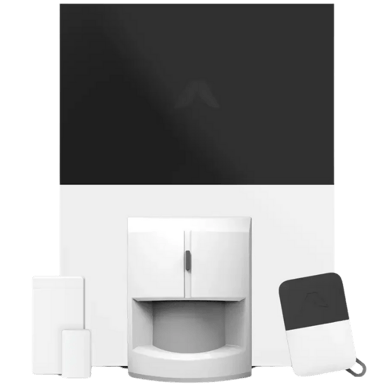

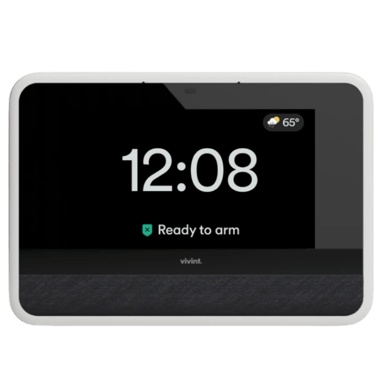
 Recaptor
 0
Cartling
0
Cartling